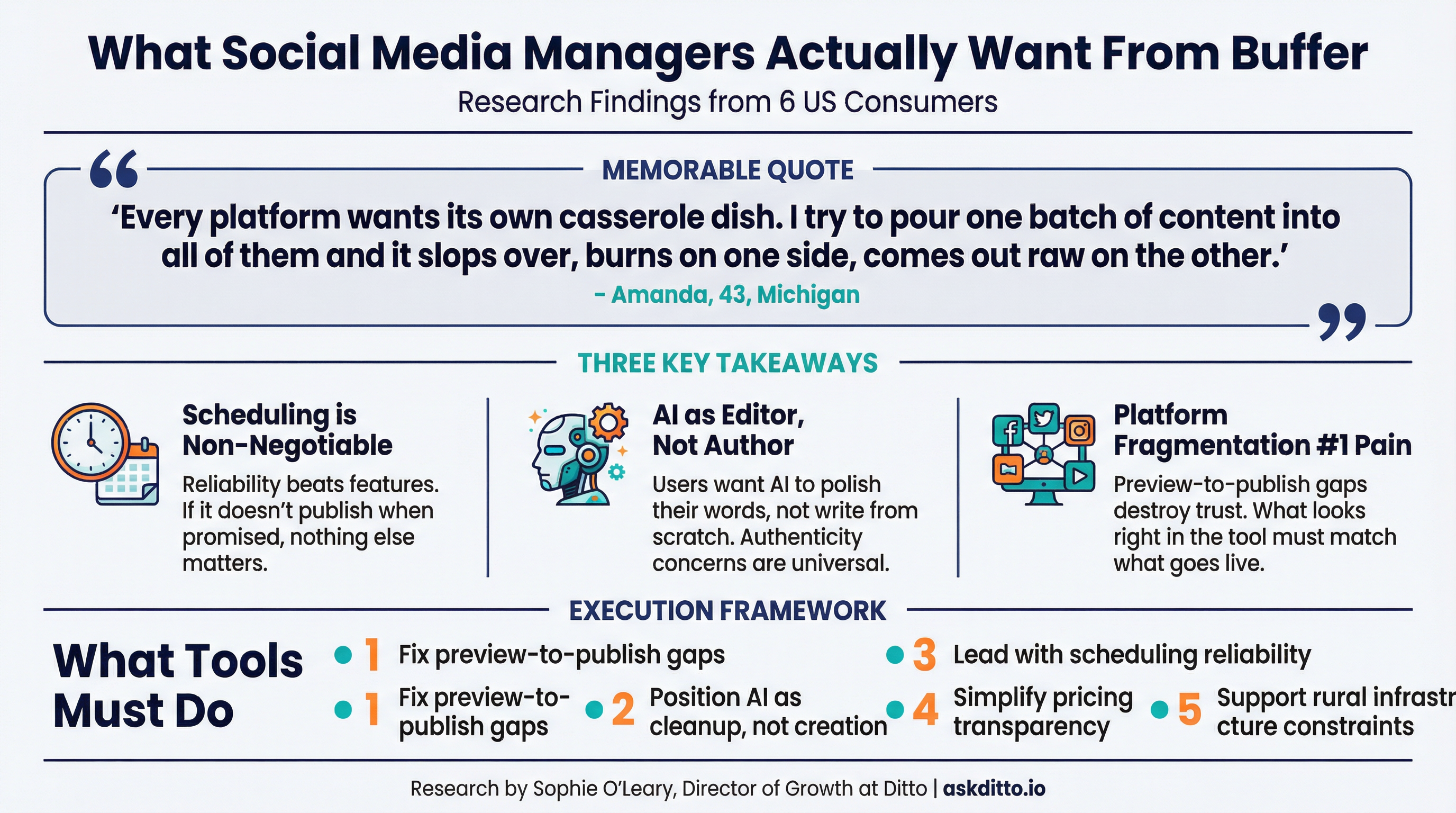
Here's something that's been bugging me about social media management tools: they promise to save time, but everyone I talk to still seems to spend hours babysitting their scheduled posts. So I asked six American consumers who manage social media, whether for small businesses, churches, or nonprofits, what actually frustrates them about cross-platform posting. The answers were remarkably consistent, and they reveal a gap between what tools promise and what users actually need.
I ran a study with six US consumers across different contexts: a healthcare office manager in New Jersey, a stay-at-home parent running a nonprofit's social in Las Vegas, a gas station assistant manager in rural Idaho, a childcare worker in rural Michigan, a former HR professional managing PTA and church accounts in Dallas, and a patient access representative in Denver. What unites them? They all manage multiple social media accounts with limited time and resources.
The Participants
This was a pragmatic group. Brian, 38, handles social for a healthcare organisation in rural New Jersey, worrying about HIPAA compliance in DMs. Jacob, 30, volunteers for a literacy nonprofit during his toddler's nap window. Ronnie, 37, manages social for a rural Idaho gas station on slow DSL. Amanda, 43, handles daycare and church rummage sale posts in rural Michigan. Bridgett, 51, coordinates PTA and church communications in Dallas. And Analaura, 25, juggles pantry reminders and church posts after hospital shifts in Denver, with hearing loss that makes accessibility crucial.
What they share: time constraints, tight budgets, and zero patience for tools that create more work than they save.
The Cross-Platform Problem: Every Platform Wants Its Own Casserole Dish
When I asked about their biggest frustration with posting across multiple platforms, the response was almost poetic in its consistency: platform fragmentation turns one piece of content into three or four different headaches.
"Every platform wants a different size and rule, so I end up redoing the same post three times and something still gets cut off."
That's Ronnie from rural Idaho. And Amanda in Michigan put it perfectly: "Every platform wants its own casserole dish. I try to pour one batch of content into all of them and it slops over, burns on one side, comes out raw on the other."
The specific frustrations that emerged:
Format roulette: Square here, vertical there, hashtags that look fine in one place and ugly in another
Previews that lie: Looks perfect in the scheduler, posts live with the caption clipped or thumbnail wrong
Reach feels nerfed: Scheduled posts seem to get buried compared to native posting
DMs and comments splinter everywhere: Following up means platform-hopping instead of one inbox
Missing features: Can't properly tag pages, can't add music, can't schedule Stories the way they need
Login booby traps: Re-auth cycles, 2FA timeouts, connections breaking randomly
Bandwidth pain: Rural LTE means video uploads time out repeatedly
Key insight: The 'write once, publish everywhere' promise is broken. Users still do platform-specific cleanup, which negates most of the time savings.
AI Content: Time-Saver or Authenticity Killer?
Buffer includes an AI assistant to help write and refine posts. I asked how useful AI-generated content would be for their workflow, and whether it would save time or feel inauthentic. The answer was nuanced: useful as an editor, dangerous as an author.
"Useful in tiny doses, annoying if it tries to run the show. If Buffer's AI helps me tidy the words I already wrote, fine. If it starts chirping like a brand manager, I'm out."
That's Amanda, the Michigan childcare worker. The pattern across participants was clear: AI is welcome for drafts, grammar, and cleanup. It's rejected when it tries to write from scratch.
Where AI helps:
Trimming rambling captions into tight copy
Grammar and spelling cleanup when tired
Alt text first drafts (but needs human review)
Format variants of the same message for different platforms
Basic hashtag sanity checks (3, not a hashtag salad)
Where AI fails:
Writing from scratch (sounds like 'beige caption everyone scrolls past')
Patient stories, policy changes, anything needing real empathy
Local colour and community voice (rural Facebook wants specifics)
Hot topics or anything politically sensitive
Key insight: AI as a 'sharp pair of scissors' works. AI as 'the whole pen' doesn't. Users want to keep their voice while reducing editing time.
Feature Priorities: Scheduling Wins, Team Features Lose
I asked what matters most when evaluating a social media management tool: scheduling, analytics, team collaboration, or price. The ranking was nearly unanimous.
"Scheduling first, always. If it doesn't publish when it says it will, or it makes me babysit drafts at 11 p.m. after a swing shift, I'm done."
That's Analaura in Denver. Here's how the priorities stacked up:
Scheduling (nearly unanimous #1): Must be rock-solid, mobile-friendly, and actually publish reliably
Price (#2 for most): Transparent tiers, no silly caps, easy cancel. If basics are paywalled, they leave
Analytics (#3): Only useful if it drives action. 'Vanity confetti' charts that don't change behaviour are worthless
Team collaboration (last): Most are solo or tiny teams. Fancy approval workflows are noise
The consistent theme: reliability beats features. If scheduling works perfectly, users will forgive limited analytics. If scheduling fails, nothing else matters.
Key insight: For small operators, team collaboration features are oversold. They want bulletproof scheduling and honest pricing, not workflow engines for teams they don't have.
What This Means for Social Media Management Tools
If you're building or marketing a social media scheduling tool, this research suggests some clear directions:
Fix the preview-to-publish gap. If it looks different in the tool than when it posts, trust is destroyed.
Acknowledge platform divergence. Users need per-platform tweaks. Make those adjustments fast, not buried.
Position AI as cleanup, not creation. 'Polish your draft' is appealing. 'Let us write for you' triggers authenticity alarms.
Lead with scheduling reliability. Uptime stats, failed-post rates, and 'it just works' testimonials matter more than feature lists.
Simplify pricing. Hidden caps, seat-based gating, and auto-renew traps drive people to manual posting.
Don't oversell team features to solopreneurs. Most small operators have one approver, not a content team.
Support rural infrastructure. Slow connections, power outages, and spotty mobile coverage are real constraints.
The Bottom Line
Buffer and tools like it solve a real problem: the exhausting reality of maintaining presence across multiple platforms. But the gap between promise and delivery remains wide. Users don't want another dashboard to babysit. They want to queue a week's posts, hit go, and trust that everything fires correctly without manual intervention.
The verdict from these six consumers? They'd use Buffer if scheduling is genuinely bulletproof, pricing is transparent, and AI stays in its lane as an editor rather than an author. The moment they're standing in a driveway refreshing a broken post, the 'all-in-one' promise becomes an 'all-in-one headache.'
What the Research Revealed
We asked real consumers to share their thoughts. Here's what they told us:
What's your biggest frustration with posting across multiple platforms?
Ronnie Zill, 37, Administrative Assistant, Rural, ID, USA:
Every platform wants a different size and rule, so I end up redoing the same post three times and something still gets cut off. On our slow DSL, video uploads crawl, stall at 97%, then fail. DMs land in five places. I just want one draft that looks right everywhere without babysitting it.
Brian Sundberg, 38, Office Manager, Rural, NJ, USA:
Biggest one: platform quirks kill the one-and-done plan. I queue a post, and then tags don't resolve, crops shift, link previews pull the wrong image, alt text gets lost, or the video ratio looks off on one channel. So I touch the same post three times. Waste.
Jacob Ferris, 30, Stay-at-Home Parent, Las Vegas, NV, USA:
Every platform wants a different crop, caption length, tag format, and link behavior, so the same post turns into three or four slightly different rebuilds. Previews lie. Comments and DMs splinter everywhere. Price creep and feature gating for tiny teams is annoying.
Bridgett Letourneau, 51, Stay-at-Home Parent, Dallas city, TX, USA:
Biggest frustration? Silent failures and rework. If I have to babysit every post because each platform treats links, tags, and images differently, the scheduler is just a pretty spreadsheet with extra steps.
Amanda Funk, 43, Home Health Aide, Rural, MI, USA:
Every platform wants its own casserole dish. I try to pour one batch of content into all of them and it slops over, burns on one side, comes out raw on the other. Hashtags look fine in one place, ugly in another. Media sizing whiplash.
Analaura Liberty, 25, Administrative Assistant, Denver city, CO, USA:
Accessibility getting mangled is number one. If captions or alt text get stripped or shortened, I'm annoyed. I need clean captions. Format roulette, edits after posting in five places, features missing with schedulers, music rights chaos, comment sprawl.
How useful would AI-generated social media content be for your workflow?
Brian Sundberg, 38, Office Manager, Rural, NJ, USA:
Short answer: useful for drafts, risky for voice. It can still feel a little plastic if you let it run the show. Where it helps: kickstart copy from a rough note, trim wordy updates, spin headline options. Where I won't use it: patient stories, policy changes, anything that needs real empathy.
Ronnie Zill, 37, Administrative Assistant, Rural, ID, USA:
Honestly, I'd only use it to tidy a caption or fix spelling. It might save a little time on a crazy day, but if it starts sounding slick or city-marketing, that feels inauthentic. Folks here can tell when a post isn't our voice.
Bridgett Letourneau, 51, Stay-at-Home Parent, Dallas city, TX, USA:
Useful as an editor, not as a ghostwriter. AI helps me tighten, strip filler, and spit out 2-3 headline options so I can pick fast. But if it writes from scratch, it turns into glossy Hallmark-scented marketing mush I cannot stand.
Jacob Ferris, 30, Stay-at-Home Parent, Las Vegas, NV, USA:
It would help me in narrow, boring lanes, but I don't want it speaking for me. The default AI voice reads like the same beige caption everyone scrolls past. As an assistant, fine. As an author, hard no.
Analaura Liberty, 25, Administrative Assistant, Denver city, CO, USA:
Short answer: both. It would save me time on low-stakes stuff, and it would feel fake fast if it starts spitting LinkedIn-sounding fluff. Having an AI kick out a first draft from my bullet points is a win. But I do not trust it to own my voice.
Amanda Funk, 43, Home Health Aide, Rural, MI, USA:
Useful in tiny doses, annoying if it tries to run the show. If Buffer's AI helps me tidy the words I already wrote, fine. If it starts chirping like a brand manager, I'm out. Let me paste my words, clean them up fast, and keep my voice.
What matters most when evaluating a social media management tool?
Brian Sundberg, 38, Office Manager, Rural, NJ, USA:
Scheduling first. If I cannot queue a month, set time windows, and lock approvals so no one posts sloppy PHI at 9 pm, it's a nonstarter. Analytics second, but only the stuff that ties to real outcomes. Price third as TCO. Team collaboration last for us.
Jacob Ferris, 30, Stay-at-Home Parent, Las Vegas, NV, USA:
Scheduling: This is the top. If the queue is solid, the calendar view is clean, posts actually fire on time, and the mobile app doesn't crash, I'm happy. Price: Second place. I will not pay for fluff. Analytics: Useful only if it helps me decide what to post next. Team collaboration: Last for me.
Ronnie Zill, 37, Administrative Assistant, Rural, ID, USA:
Scheduling first, then price, then analytics, and team last. I work odd hours and our DSL is slow. I need one draft that posts right everywhere and I do not want to babysit uploads. Clear monthly, no surprise fees, easy cancel.
Amanda Funk, 43, Home Health Aide, Rural, MI, USA:
Price first, always. Then dead-simple scheduling. The rest is nice-to-have. If it's pricey or traps me in a yearly contract, I'm out. Month-to-month, no sneaky fees. Scheduling has to be rock-solid and stupid-easy.
Bridgett Letourneau, 51, Stay-at-Home Parent, Dallas city, TX, USA:
Bulletproof scheduling wins. If posts don't publish correctly per platform, the rest is lipstick on a pig. Non-negotiable: per-platform customization, accurate previews, reliable link handling with UTMs, and no silent failures.
Analaura Liberty, 25, Administrative Assistant, Denver city, CO, USA:
Scheduling wins by a mile. If it doesn't publish when it says it will, or it makes me babysit drafts at 11 p.m. after a swing shift, I'm done. I want to stack a week's posts, set times, add alt text, and walk away. No fiddling. No surprises.
Want to understand how your target customers really feel about your product? Ditto lets you run studies like this in hours, not weeks.