Six small business owners. Three questions. One uncomfortable reality: Mailchimp looks polished and trustworthy, but feels built for someone else.
I ran a study with six US consumers to understand how potential customers perceive Mailchimp's landing page and value proposition. These weren't marketing agencies or e-commerce brands with dedicated teams. They were a warehouse manager from Norfolk, a childcare site lead from Anchorage, a construction cleaning business owner from rural Tennessee, a property manager from rural Florida, an unemployed adult from rural Massachusetts, and an executive assistant from O'Fallon, Missouri. What united them: all were small business operators or administrators who needed email marketing, and all felt that Mailchimp's messaging wasn't quite talking to them. The findings reveal a consistent pattern: respect without relevance. The platform looks capable, but the positioning screams e-commerce and retail, leaving service businesses and local operators wondering if there's a simpler tool that actually fits their world.
The Participants
The research group included a warehouse shift lead from suburban Norfolk who's mobile-first and budget-savvy; a childcare site lead from Anchorage raising two kids on a tight budget; a post-construction cleaning business owner from rural Tennessee with a dependable, no-nonsense approach; a bilingual property manager from rural Florida juggling tenants, owners, and vendors; a disabled, unemployed adult from rural Massachusetts running a small craft and tutoring hustle; and a disciplined state admin professional from O'Fallon, Missouri who handles communications for her agency. What united them: all needed email marketing that just works, without requiring a marketing degree to operate or a CFO to justify.
First Impressions: Polished But Wrong Target
When asked for their honest first impression of Mailchimp's landing page and whether it felt built for businesses like theirs, participants converged on a striking disconnect: the site looks professional and trustworthy, but the messaging targets a customer they're not.
The rural Tennessee business owner captured it directly: "Gut reaction? Glossy, cute, and trying real hard to be everyone's everything. That little monkey grin and the big Start Free button... feels like a Nashville agency made it for online shops and influencers, not a muddy-boots outfit chasing punch lists."
This mismatch between positioning and audience repeated across participants. The site's aesthetic signals competence. The messaging signals e-commerce. For service businesses, local operators, and administrators, this creates a cognitive dissonance: the tool might work, but it's clearly not designed with their reality in mind.
The Norfolk warehouse manager articulated the pricing concern that shadowed every first impression: "It feels more like a marketing department tool than a scrappy local shop trying to send a simple newsletter. On my phone it looks slick and very polished. Feels big-company - lots of shiny words and upsell energy. It loads fine on 5G, but there's a lot of scrolling before I see plain talk on what I actually get for the money."
Rural users raised specific concerns about the site's weight and complexity. The Anchorage childcare lead noted that on her slow Chromebook, 'it feels like walking into a shiny mall when I just want a sturdy winter coat.' The rural Florida property manager worried about page load times on her rural connection: 'Heavy visuals. On my rural connection, pages like that lag. If the dashboard is similar, I'm annoyed already.'
Key insight: Mailchimp creates competence signals that it then undermines with misaligned positioning. Users see a capable platform. They just don't see themselves in it.
Pricing Clarity: Contacts, Sends, and the Fear of Cost Creep
The second question asked whether Mailchimp's pricing and features were clear at each tier. The response was consistent: the tier names look organised, but the actual costs feel like a moving target tied to multiple variables that users can't easily control.
Bottom line - it is not clear at a glance. The tier names look clean, then the fine print kicks in and the real cost depends on contact counts, monthly send caps, and a pile of limits that move as soon as you grow.
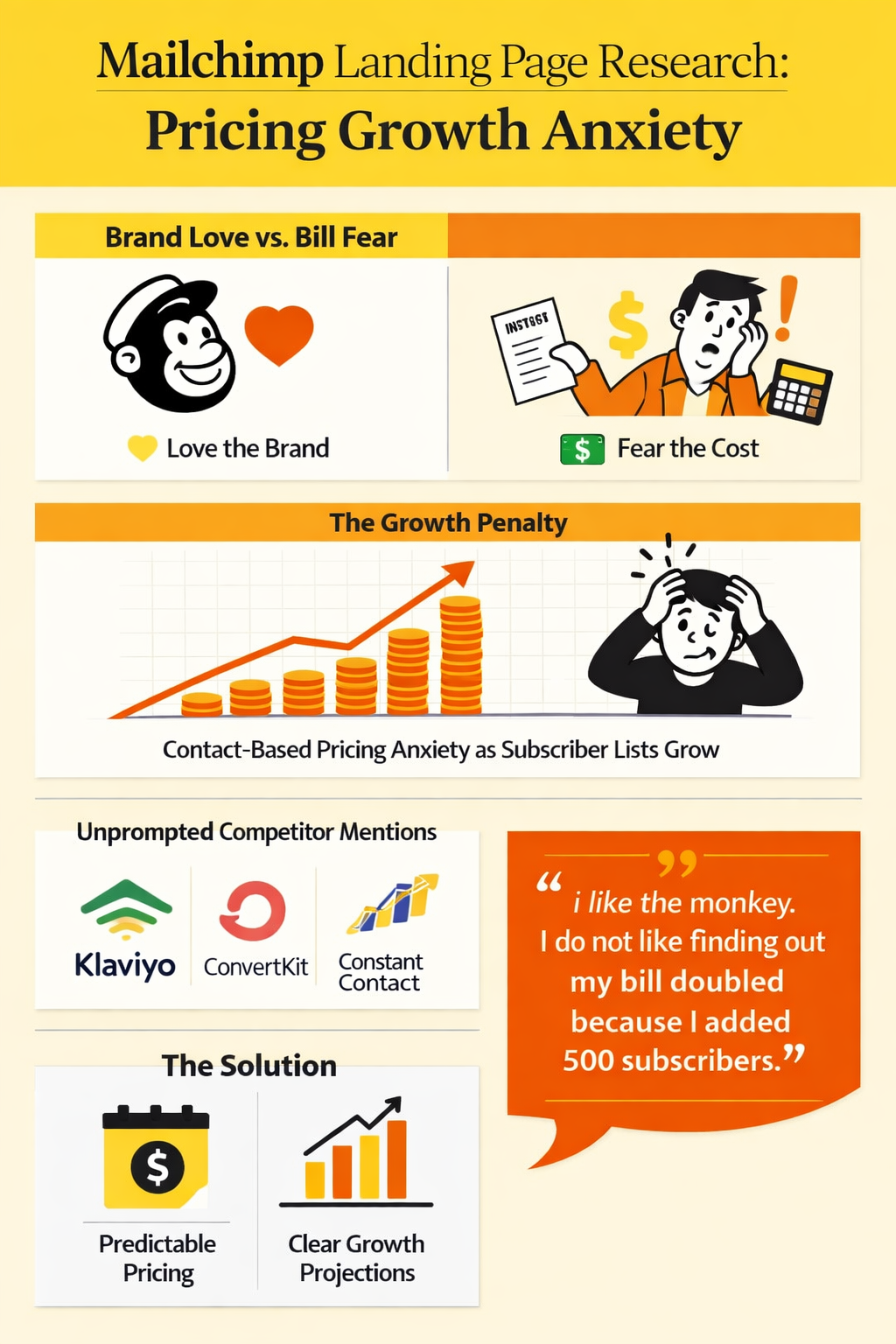
This quote from the O'Fallon executive assistant captured the frustration every participant expressed. Pricing that depends on both contacts AND sends creates compound anxiety: users feel metered twice over, and any growth becomes a financial risk rather than a success.
Specific concerns about pricing clarity included:
Whether unsubscribed or inactive contacts still count against billing
Price jumps at contact thresholds that feel like 'gotchas'
Monthly send limits and unclear overage policies
Feature gates between tiers that aren't obviously different
Seat limits and extra charges for adding team members
Support tiers that feel punitive at lower price points
The rural Massachusetts participant expressed the fundamental concern: "I can't tell who counts. Do unsubscribed or cleaned names still push me into a higher price? Price jumps at tiny steps. Going a little over a contact limit looks like a big bump. That feels like a gotcha."
The rural Tennessee business owner framed the issue in relatable terms: 'Reminds me of buying gravel by the ton... looks cheap till you tack on delivery, fuel surcharge, and the you live down a holler fee.' For users running tight operations, unpredictable pricing isn't just inconvenient. It's disqualifying.
Key insight: Mailchimp's pricing creates anxiety about growth. When adding contacts means higher bills and uncertain thresholds, success feels like a penalty. Users want predictable costs, not dynamic pricing they have to monitor.
What Would Win Their Business
The final question asked what Mailchimp would need to show or guarantee to make participants choose them over competitors. The responses were remarkably specific and consistently focused on operational realities rather than feature lists.
Plain pricing with no games topped every list. Users want a single number that includes everything: seats, support, add-ons, taxes, and overages. They want month-to-month billing without penalties. They want price locks for at least 12 months. As the Norfolk warehouse manager specified: "Clear pricing that stays put. Show the full monthly cost up front, taxes and all, no sneaky add-ons for extra audiences or seats. Promise no price jump just because I cleaned duplicates or crossed some weird contact threshold."
Migration support and done-for-you setup would remove a major barrier. Users don't have time to learn a new platform from scratch. The rural Tennessee business owner demanded: "Do the migration for me. 1-hour kickoff, you import my lists, tag them, rebuild my current automations, set the nerdy domain stuff so my emails come from my domain, and clean my list. Put it in writing that I won't lose contacts or history."
Real human support with stated response times matters more than any feature. Users want phone numbers, not chatbots. They want weekend coverage for when campaigns go wrong. They want named contacts during onboarding. The Anchorage childcare lead specified: "Live chat that answers inside 2 minutes during Alaska hours. Saturday help, even if shorter. No we'll email you in 48 hours when it breaks before a field trip note."
The proof requirements extended to technical specifics:
Deliverability proof with inbox placement tests, not marketing claims
Mobile-first workflow that works on phones with weak signals
Native integrations with tools they actually use (QuickBooks, Google Sheets)
Templates for their specific industries, not just e-commerce
Bilingual support for users serving Spanish-speaking communities
The O'Fallon executive assistant offered the most comprehensive requirements: "One written, all-in annual quote. Seats, SSO, support tier, add-ons, taxes, overages, and renewal cap. No teaser rate. No surprise uplifts. 99.9% uptime with automatic credits. Azure AD SSO, MFA enforcement, full audit logs. Native Power Automate connector. Approval chains and brand-safe templates." For enterprise users, Mailchimp needs to meet enterprise requirements.
Key insight: Users know exactly what would convert them. Transparent pricing, migration help, human support, and proof of results. These aren't unreasonable demands. They're baseline expectations for a platform asking for monthly payments.
What This Means for Email Marketing Platforms
The research reveals a clear positioning gap in small business email marketing. Mailchimp has evolved to serve e-commerce and growth-focused businesses with sophisticated automation needs. But the small business market they originally served, the service providers, local operators, and administrators, no longer see themselves in the product.
Several actionable insights emerge from this study:
Simplify pricing to a single number. Stop metering on both contacts AND sends. Pick one variable and make it predictable. Users would rather pay slightly more for certainty than risk unexpected bills.
Create positioning for non-retail businesses. Show use cases for contractors, property managers, childcare centres, and service providers. The current positioning reads 'online stores' even when the product works for everyone.
Offer done-for-you migration. The switching cost isn't price. It's time and risk. Guarantee a seamless transition with human support and users will move.
Put support response times in writing. 'Priority support' means nothing. State actual SLAs: 2-minute chat response, 4-hour email response, weekend coverage for live issues. Make it contractual.
Prove rural reliability. Show the platform working on slow connections and limited-data devices. This segment is underserved and loyal when products actually work for them.
The Positioning Problem
Mailchimp has built a powerful platform. The automation capabilities, the template library, the integration ecosystem: these are genuine assets that serve millions of businesses effectively. The friendly monkey mascot and accessible design have made email marketing approachable for a generation of small business owners.
But somewhere along the way, the positioning drifted. As the rural Tennessee business owner concluded: "It's fine, just not for folks like me by default. I'd be fighting the tool's do marketing! impulse when I just want a clean, plain note that lands in a superintendent's inbox and doesn't look goofy. If I absolutely had to, I could make it behave - but I don't feel like the target customer here."
The opportunity for email marketing platforms is significant, but only for those willing to serve the businesses that just want to send emails, not become marketers.
Want to test your own landing page and value proposition? Ditto lets you run studies like this in hours, not weeks. Book a demo at askditto.io.
What the Research Revealed
We asked real consumers to share their thoughts. Here's what they told us:
Imagine you are a small business owner looking for an email marketing tool. You land on Mailchimp.com. What is your honest first impression? Does it feel like it is for businesses like yours?
Betty Flores, 37, Unemployed Adult, Rural, MA, USA:
Gut check? It looks shiny and friendly, but it screams big marketing team, not a one-woman craft-and-tutoring hustle like mine. The homepage talks big results and has lots of blocks, so I scroll a lot and I start to worry about limits, add-ons, and price creep, por si acaso. I don’t see my reality right away - small list, simple monthly note, Spanish support, month-to-month, no hidden fees - so it feels like I’ll have to dig to make it fit. The design is cute and clean, but it also feels busy on my little Chromebook, and I’m already thinking about time and pain in my wrists. I get a sales vibe, not a neighbor vibe, and that makes me cautious. Short answer: polished, yes; built for a shop like mine, not really unless I go slow, poke around, and trim it down poco a poco.
Shelly Pereira, 55, Warehouse Manager, Norfolk, VA, USA:
Here’s the thing: on my phone it looks slick and very polished, like big-agency polished. Feels more like a marketing department tool than a scrappy local shop trying to send a simple newsletter, you know? The monkey charm is still there, but the vibe reads big-company - lots of shiny words and upsell energy. It loads fine on 5G, but there’s a lot of scrolling before I see plain talk on what I actually get for the money. Does it feel for businesses like mine? Kinda, but mostly if I plan to grow fast and hook into a bunch of online store stuff. For a small service biz with a few hundred contacts, it smells like free-now, pay-more-later. Good first hits: trustworthy feel, decent templates, mobile sign-up isn’t a pain, clear “start free” button. Red flags: pricing tied to contacts and sends - that creeps up; buzzwords like “journeys” and “omni” when I just want “send email”; upgrade nudges everywhere; feels heavier than I need. Gut read: not built for bare-bones newsletters - more for folks running carts, funnels, the whole stack. If I were actually running a tiny shop here in Norfolk, I’d try it only if I knew I’d use the automation; otherwise it’s overkill and I’d worry about the bill sneaking up on me. Cloudy day and all, I’m just not in the mood to wrestle with another platform that wants my card before it talks straight.
Anthony Allman, 37, Construction Manager, Rural, TN, USA:
Gut reaction? Glossy, cute, and trying real hard to be everyone’s everything. That little monkey grin and the big Start Free button... feels like a Nashville agency made it for online shops and influencers, not a muddy-boots outfit chasing punch lists. Does it feel built for my kind of business? Not really. It’d probably work, but it doesn’t talk my language. I’m thinking simple: upload a short list of GCs and PMs, send a quarterly note with before-after photos, maybe a schedule update around holidays. Their page screams automations-journeys-funnels and all that jazz. What hits me right away: Vibe: Playful and ecommerce-heavy. Reads like it’s courting trendy brands, not trades who bill net-30 and live by callbacks. Complexity: Lots of tiers, features, and buzzwords. I don’t want a “platform.” I want to hit send and get back to work. Pricing feel: The “pay by contacts” thing makes me squint. I hate feeling metered. Templates: Pretty, sure. Also a little too “coupon-y.” I worry glossy emails make me look like a chain, not a reliable local crew. Upsell scent: Website, CRM, SMS - it’s all peeking around the corner. I can smell the nudge to upgrade. What I do like: Polish: It looks stable and mainstream, which is comforting. Quick start: I could likely drag-drop a decent update in an hour, once, then clone it. My honest take: It’s fine, just not for folks like me by default. I’d be fighting the tool’s “do marketing!” impulse when I just want a clean, plain note that lands in a superintendent’s inbox and doesn’t look goofy. If I absolutely had to, I could make it behave - but I don’t feel like the target customer here.
Leslie Messer, 37, Elementary School Teacher, Anchorage municipality, AK, USA:
Gut reaction: it looks polished and safe, but a bit loud and salesy. Big bright buttons, lots of buzzwords. On my slow Chromebook with coffee and -5C outside, it feels like walking into a shiny mall when I just want a sturdy winter coat. Feels like it’s for me: Kind of. The templates and drag-and-drop bits look friendly. I can picture a simple newsletter for parents and a basic signup form. That part fits. Where it loses me: The examples scream online stores and influencers. Lots of “journeys,” “automations,” and cross-channel talk. For a local service business, that reads like overkill. Pricing vibe: Tiers on tiers. Looks like it starts small then creeps up as your list grows. That makes me wary on a tight winter budget. Trust feel: Solid brand, clean design. But the upsell energy is strong, so I’m watching for limits and fine print. Bottom line: I’d use it for a basic newsletter, but it does not exactly feel built around scrappy, service-based outfits like mine. More like I’m a small fish swimming in a tool built for stores. If I kept going, I’d stick to the simple stuff and ignore the flashy extras. If that gets messy, I’d just try one other option and call it good.
Nicole Lovvorn, 38, Property Manager, Rural, FL, USA:
Gut check on landing: clean, polished, a little cutesy with the mascot. My first thought is, OK, this is built for online shops and design folks, not a boots-on-the-ground service business juggling real people and slow rural internet. It looks trustworthy and big, which I like for deliverability, but it also screams tiers, add-ons, and upsells. Cute is fine, but I need to send clear emails fast, not swim through features I’ll never use. What hits right: - Professional and organized feel. I trust it will actually send. - Clear CTAs. I can find the sign-up button without hunting. - Feels like there are solid templates so I’m not reinventing the wheel after dinner and soccer practice. What rubs me wrong: - Pricing gives me that you’ll pay more once you grow a hair vibe. Contact limits, features gated... I can smell it. - Heavy visuals. On my rural connection, pages like that lag. If the dashboard is similar, I’m annoyed already. - Lots of ecommerce talk. I do leases and notices, not shopping carts. - Not obvious if bilingual is smooth. I need easy toggles for English and Spanish and clean accented characters, en español, sin enredos. Does it feel like it’s for businesses like mine? Halfway. It feels like I could make it work for a property list or owner updates, but it’s not speaking to landlords or service operators. I don’t see my use case on the page, and that matters. If I had to decide on gut alone, I’d spin up a basic list and test one bilingual newsletter. If the setup turns fiddly or the price jumps when my contacts creep up, I’d bounce and not look back.
Crystal Rapoport, 46, Executive Assistant, OFallon city, MO, USA:
Bottom line: polished and a little cutesy. My guard goes up. If I put on the small-business hat, it feels built for louder ecommerce brands, not a one-person shop that just needs reliable newsletters and basic automations. Too much vibe, not enough facts. Big headlines, soft promises. I want a stripped list of features, limits, and what I get on Day 1.Pricing feels like a funnel. If I have to click around to find plain tiers and sending limits, I assume upsells and surprise overages.Not speaking to service businesses. The imagery and copy read retail-first. Where is the straight talk for local services, nonprofits, or B2B?Integration clarity is buried. I want to see, right up front, if it plays nice with my Microsoft workflow, CSV imports, and basic compliance. I do not want a scavenger hunt.Support transparency is fuzzy. I look for hours, channels, and response times. If I cannot spot it in 10 seconds, I assume chatbots and wait queues.Data use gives me pause. Lots of tracking and growth talk, light on how my list is protected. I am cautious with customer data, so I need that spelled out. Does it feel like it is for businesses like mine? No, not on first load. It could still work, but the brand gets in the way of the facts. Show me a simple path - pick a plan, import a CSV, send a tested template by Friday - and I would relax. As is, it feels like I am being sold to, not supported.
What would Mailchimp need to show or guarantee to make you choose them over competitors like Klaviyo, ConvertKit, or Constant Contact? What proof points or features would seal the deal?
Shelly Pereira, 55, Warehouse Manager, Norfolk, VA, USA:
Here’s the thing… if they want me to switch, they gotta prove they won’t waste my time or quietly jack up the bill, you know? Clear pricing that stays put - show the full monthly cost up front, taxes and all, no sneaky add-ons for “extra audiences” or seats. Promise no price jump just because I cleaned duplicates or crossed some weird contact threshold. Mobile-first or no deal - I need to build, edit, import a CSV, schedule, and check stats on my phone. Fast-load, no desktop-only steps, no heavy downloads. Give me dark mode previews and link checks before I hit send. Real deliverability proof - plain-English inbox rate, spam complaints, and what they did to fix issues. Walk me through connecting my sender email without a bunch of tech gobbledygook, and back it with a simple checklist I can follow at 6 a.m. Solid templates that don’t break on small screens - clean, readable, accessible sizes, image compression baked in. Not cute… just reliable. Support that actually answers early - live chat with a human before sunrise and after dinner, and a callback option. I don’t have time to sit on hold during my shift. Basic automations without a maze - welcome notes, birthday, reorder nudges, tags and segments that act like simple switches. If I need a certification to run it, hard pass. Easy in, easy out - import from Google Sheets and export everything anytime. Month-to-month, cancel from the phone, no chasing some buried form. Data-light, privacy-right - does not chew my 5G data, and no sharing my lists with “partners.” One-tap unsubscribe that just works. Honest proof points - short case studies from normal outfits like a parish group or a small shop, with screenshots from a phone, not polished ad fluff. Public status page with uptime history and a make-good if they blow a send window. Respect for budgets - fair nonprofit or small-org pricing, not a teaser rate that turns into a gotcha in month three. If they nickel-and-dime on contacts, force desktop steps, or hide the cancel button, I’m out. Show me all that, and yeah, I’d pick them over the others and not look back.
Leslie Messer, 37, Elementary School Teacher, Anchorage municipality, AK, USA:
Short version: I’ll pick the one that saves me time, fits our budget, and doesn’t jerk me around. If you hide the price or make me sit through a sales call, I’m out. If you can cut my Sunday night prep from 45 minutes to 20, you win. Plain pricing: One page, all-in. No surprise contact caps, no goofy overage fees. Month-to-month, price hold for 12 months. Clear nonprofit or school-rate. If I pause in summer, I don’t pay full freight. Migration help: Free import, clean duplicates, and rebuild my 2 main templates. Done in 3 business days. A human checks my list health and gives me a simple go-live checklist. Deliverability proof: Public uptime page, last 90 days. Show average deliverability and what you do when school filters get picky. Easy domain setup with step-by-step and plain words. If something bounces, tell me why in normal language. Real support, Alaska-friendly: Live chat that answers inside 2 minutes during Alaska hours. Saturday help, even if shorter. No “we’ll email you in 48 hours” when it breaks before a field trip note. Templates that fit my world: Clean school-newsletter and event-reminder templates. Logo, colors, big buttons. Works on a budget Android phone. No design degree needed. List sanity: Double opt-in switch I can toggle. Simple parent-consent note. One-click unsubscribe that actually sticks. Family households grouped without me hacking CSVs. Time savers: Schedule by Alaska time, resend to non-openers with one click, preheader edit, link checker. Color-coded dashboard for list health so I can spot problems fast. Reporting I can skim: Opens, clicks, bounces, and a short “what changed this week” note. Export to CSV or PDF for PTO without me wrestling a pivot table. Integrations that matter: Google Sheets, simple signup form, and a basic SMS add-on priced sanely. No giant app zoo, just the stuff normal people use. Security basics: Two-factor on by default. Clear data location and deletion policy. I do not want kid info floating around in ad land. Say it plainly. Fair trial: 30 days with full features and a clear send limit. No card required. When it ends, tell me the exact plan I need, not a sales pitch. Receipts and admin: Auto receipts with our PTO name on them, easy user roles for one backup staffer, and no extra charge for a second seat. Proof points, not fluff: Short case from a school or youth program. Screenshots, numbers, what went wrong and how you fixed it. Two-minute how-to videos, not a 40-minute webinar. If Mailchimp can show all that, in writing, with a clean checklist I can print and color-code, I’d switch. If any of it feels slippery, I’ll stick with what I’ve got and call it good.
Nicole Lovvorn, 38, Property Manager, Rural, FL, USA:
Short version: I don’t care about shiny funnels. If Mailchimp wants my business, they need to prove it saves me hours on tenant and owner comms, runs on my slow rural internet, and won’t jack my price after I get set up. No fluff, just receipts. What I’d need to see working for my world: Rock solid deliverability to common inboxes, with a simple report I can show an owner. If my open rates drop, I want a credit. Yes, I said it. Clean list tags for tenants vs owners vs vendors, property and building tags, and bilingual toggles so Spanish contacts get Spanish by default. Fast, lightweight UI and a no-bloat mobile app to push a water shutoff or storm update in under 2 minutes. Works fine on spotty LTE. Attachments and tracking for PDFs like notices, plus a basic audit log so I can prove who got what and when. Quiet hours and resend-to-non-openers built in. I don’t need a “journey.” I need Tuesday 9 a.m. and done. Easy CSV import-export so I can pull from AppFolio or QuickBooks without fighting a Zap maze. No lock-in. SMS or WhatsApp bridge for emergencies, priced plainly, opt-in clean, no gray area. Role-based access for me vs Diego or a VA, with 2FA and clear data ownership. It’s my list, not yours. Hurricane-ready templates and property notice packs in English and Spanish. Save me the formatting time. Proof points and guarantees that would actually move me: Price-lock in writing for at least 12 months. No “you hit a new tier, surprise.” Out-the-door monthly total, taxes and overage rules clear. Case study from a property manager or HOA in the Southeast, not an ecommerce shoe brand. Uptime SLA and support SLAs that don’t vanish during storm season. Real phone or chat with bilingual reps and a 30-minute callback window. 90-day trial with my actual list, no card. If I leave, export everything in two clicks. White-glove migration so my first big send doesn’t break segments. One named person, one calendar, one go-live. What would seal it for me: A 20-minute demo using a rental portfolio example with tags for properties and bilingual sends. A written price-lock and a simple deliverability guarantee vs my current baseline. Hurricane and maintenance notice template pack I can use tomorrow. So here’s what I’d need to move: 1) written price and deliverability guarantees, 2) proof it runs smooth on slow internet with bilingual tags, 3) migration help and real support during peak season. Do that, I’ll switch. If not, I’m not wasting another login.
Betty Flores, 37, Unemployed Adult, Rural, MA, USA:
Short answer: if they want me to switch, make it cheap, clear, and kind to small folks. If they hide fees or make me click ten screens to cancel, I’m out. Punto. Show me or guarantee: Total monthly price upfront - no surprise bumps for contacts, images, or sends. Lock my rate for 12 months. Month-to-month - cancel online in 2 clicks, no hard credit check, no setup fee. Spanish support by chat and phone, evenings or Saturdays, plus simple Spanish help pages. Inbox results - a quick live test that lands in Gmail and Outlook inbox, not spam. I want proof, not a blog post. No data games - you do not sell or share my list. One-click export to CSV anytime. Easy delete. Uptime and outage credit - public status page, automatic bill credit if you go down, not me chasing support. Clear contact counting - do not double charge me if one person sits in two lists. Works on cheap gear - smooth on a Chromebook and an older Android, low-data mode for spotty internet. Features that would seal it: Starter templates in Spanish and English for church notes, school updates, and small craft sales. Clean and not loud. Simple editor - drag, drop, add alt text prompts, auto-compress images, dark-mode friendly. Easy import from Google Sheets. Built-in list cleaning for bounces and dupes included in price. Basic automations I can flip on in 5 minutes - welcome, reminder, birthday. No maze. SMS add-on with clear per-text price, Spanish opt-in and opt-out. Give me a few free test texts. Pause plan for tight months at a low fee so I do not lose my setup. Por si acaso. Mobile app to send a quick update and check stats without a laptop. Real cases from tiny orgs like mine with screenshots of bills and results, not glossy talk. 30-day full trial with all key features, no surprise wall. I should get to a first send in under 15 minutes. If they can tick those boxes, fine, I’ll move. If they hike the price after three months or bury limits in fine print, no gracias. I do not have time or money for bait and switch, poco a poco.
Crystal Rapoport, 46, Executive Assistant, OFallon city, MO, USA:
Bottom line: if you want me to pick you, prove you will not waste my time, break my Microsoft flow, or jack up the price in month 13. I do not care about clever AI subject lines. I care about governance, deliverability, and cost I can forecast. Non-negotiables Pricing clarity: one written, all-in annual quote. Seats, SSO, support tier, add-ons, taxes, overages, and renewal cap. No teaser rate. No surprise uplifts. Monthly downgrade allowed. 90-day performance out if you miss SLA. SLA: 99.9% uptime with automatic credits. Published maintenance windows in Central Time. Priority incident comms by email and SMS. Security: Azure AD SSO, SCIM provisioning, MFA enforcement, RBAC with custom roles, full audit logs exportable to Microsoft 365. US data residency. SOC 2 Type II and a DPA on request. Breach notice timeline in writing. Microsoft 365 fit: native Power Automate connector, Teams notifications for approvals and failures, SharePoint list sync, clean CSV import from Excel with de-dupe and validation. If it fights my Microsoft stack, I am out. Workflow governance: approval chains, content lock, brand-safe templates, link checker, required footer fields, suppression rules that cannot be bypassed. Section 508 accessible templates with contrast and alt-text checks. Deliverability proof: domain auth wizard for SPF, DKIM, DMARC plus BIMI support. Seed tests, bounce management, and a clear IP plan. I want before-and-after inbox placement on a pilot, not marketing fluff. Records and compliance: immutable archive of sends and subscriber consent history for Sunshine Law requests. Time-stamped consent fields, unsub management, and exportable logs. Data ownership: full export of lists, segments, templates, and automations in human-readable formats. Migration support included. No hostage tactics. Support that answers: business-hour phone plus chat with sub-1-hour first response. After-hours escalation path. Named contact during onboarding. Reporting I can use: clicks, bounces, list health, UTM tagging, and a scheduled data drop to SharePoint or a Power BI-friendly feed. Do not sell me opens as a success metric. Proof points Two Midwest public-sector references with similar volume and Microsoft stack. Names, not logos. 30-day pilot: 2 campaigns plus 1 automation. Your team does the lift with my SharePoint list. Measure deliverability, build time, and issue count against my current tool. Last 12 months uptime record and a current SOC 2 letter. VPAT for accessibility. Nice to have Template locking by department with content blocks I can update once and push everywhere. Form builder that drops onto a SharePoint page without breaking styling. Simple Power Automate actions: add to list, apply tag, trigger flow on click-bucket, and post a Teams summary after send. Deal-breakers Hidden fees, forced annuals without performance outs, or price games at renewal. Weak audit logs or no Azure AD SSO. AI hype taking priority over deliverability, governance, and Microsoft integration. What does success look like? By day 45, my lists and 3 core templates live, approvals running in Teams, deliverability equal or better than current, and total cost predictable for 12 months. If you cannot hit that, I am not switching.
Anthony Allman, 37, Construction Manager, Rural, TN, USA:
Short version: prove you’ll save me hours, not nickel-and-dime me, and give me a human I can reach. Everything else is fluff. What I’d need from Mailchimp to pick you over Klaviyo, ConvertKit, or Constant Contact: Plain pricing, no traps - month-to-month, clear sending limits, no sneaky add-ons. Price-lock for 12 months. Seasonal pause without penalties. If you bump my price because I crossed some goofy threshold by 50 contacts, I’m out. Do the migration for me - 1-hour kickoff, you import my lists, tag them, rebuild my current automations, set the nerdy domain stuff so my emails come from my domain, and clean my list. Put it in writing that I won’t lose contacts or history. Deliverability with receipts - show me inbox placement for Gmail and Outlook for B2B lists like builders and GC offices. I want a simple scorecard, not a TED Talk. If my open rate tanks in month one, credit my bill. Have a status page and own your outages. Real integrations, not duct tape - native hooks to QuickBooks and Jobber so events fire automations: estimate sent, estimate approved, invoice paid, job completed. Google Workspace sync that doesn’t duplicate contacts. I don’t want to pay for Zapier on top. Prebuilt playbooks for trades - drop-in sequences I can tweak in 10 minutes: Estimate follow-up at 2, 7, 14 days Post-job review ask with a one-tap link to my Google profile Referral nudge with basic tracking so I know who sent who Seasonal reminders tied to pollen, gutters, pressure wash, punch-list prep SMS that isn’t a circus - local number, you handle the registration junk, quiet hours, pay-as-you-go. Let me mix text + email in one workflow without feeling like I’m breaking a law. Mobile-first workflow - I’m in a truck between sites. Let me approve and send from my phone, slap before-after photos into a clean template, and hit go. Keep it fast on weak country internet. Human support - a named rep for 60 days, phone number with CST hours. No chatbot maze. If I say “my domain’s failing,” don’t send a link, just fix it with me on the call. Data ownership and clean exit - one-click export for contacts, segments, templates, automations, and suppression lists in normal files. A promise you won’t sell or train on my data. Straightforward analytics - one dashboard I can read in 30 seconds: who opened, who clicked, who asked for a quote, what money came back. I don’t need a PhD chart. No buzzword soup - keep the AI magic tricks optional. If you’ve got subject line suggestions, fine. Don’t make me use them or pay extra. Proof points that would actually move me: Two case studies from small service companies in the Southeast, with names I can call. Show repeat work up, reviews up, churn down. Real numbers, not percentages without context. 90-day guarantee - if deliverability or migration stinks, refund me. No arguing. Uptime SLA and a public incident log. Own it when it breaks. Pilot my own list for a month with all features turned on, not a crippled trial. Seal-the-deal combo for me: Price-lock + seasonal pause Done-for-you migration in a week Native Jobber + QuickBooks triggers Trades templates out of the box Named rep for the first 60 days Do that, and I’ll move without blinking. If it turns into upsell bingo or I gotta watch a 45-minute webinar to send a simple follow-up, I’ll keep doing what already works and call it a day.
Looking at Mailchimp pricing and features, is it clear what you get at each tier? What concerns you about the pricing structure or what feels confusing?
Shelly Pereira, 55, Warehouse Manager, Norfolk, VA, USA:
Here’s the thing: on my phone it looks neat at first, but once you start tapping the little info dots and footnotes, it turns into guesswork. I helped with our parish newsletter once and poked around their tiers, and I still couldn’t get a clean read on what the real monthly cost is without a spreadsheet. The whole starting at price plus list-size sliders plus feature lockouts feels a bit like a shell game, you know? Also, the page is tap-happy on mobile, which burns time and data. I just want one straight line that says what you get and what it actually costs when your list grows by even 500 people. Stuff that worries or confuses me: Contacts vs subscribers: Do I pay for people who unsubscribed or are inactive, or only the ones I actually email? That bit never reads crystal clear. Price jumps by list bracket: Looks fine at 500 or 1,000, then you nudge the slider and boom, big jump. The annual toggle showing a lower per-month number is a little sneaky. Send limits and overages: Monthly sends vs daily throttles vs auto-upgrade if you go over... it’s muddled. I don’t want surprise charges. Feature gates: A/B vs multivariate, automation flows, advanced segments, scheduled send times... too many are locked behind higher tiers with tiny asterisks. Seats and permissions: How many users are included before you start paying extra? Not laid out plainly. Support levels: Who gets chat or phone support and when? That matters if you’re not a pro, and it’s not obvious. Audiences: Limits on how many lists you can have at lower tiers are easy to miss in the fine print. Bottom line, it’s not clear enough at each tier, at least not on a phone. It feels like you need to simulate your actual list size, sends, users, and a couple features just to see the real number, and I don’t love that.
Leslie Messer, 37, Elementary School Teacher, Anchorage municipality, AK, USA:
Short answer: not super clear at first glance. The names sound tidy, but the real rules live in footnotes and tiny toggles. After 10 minutes I can sort it out, but I resent having to. What feels confusing or sketchy to me: Contacts vs audience vs subscribers: I can’t tell if I’m paying for everyone in the list, even the unsubscribed or inactive folks. That makes me nervous. Send limits and overages: The monthly cap math isn’t front and center. I want a simple "you can send X total emails to Y people" line, not caveats. Price jumps at list thresholds: Looks cheap until you cross a band, then it spikes. Feels like cell phone data tiers from 2012. Feature gates: Which tier actually includes automations, A/B tests, and scheduling without weird limits? The checkmarks blur together. Seats and access: If two staff log in, do we pay more, or are we breaking rules by sharing? That’s not obvious. Support level: When do you get real-time help vs email-only? Hidden behind fine print. Monthly vs annual: I can’t tell how easy it is to downgrade or pause without penalties. Our usage is seasonal, so that matters. Add-ons everywhere: SMS, templates, sites... It starts to feel like a bundle trap. I just want email, clean and simple. If they put a single, printable grid with a slider for list size and plain language on limits, I’d feel better. Right now it feels like nesting dolls: open one tier, surprise, there’s another rule inside.
Betty Flores, 37, Unemployed Adult, Rural, MA, USA:
Short answer: not fully clear. The chart looks simple at first, but the limits and the little add-ons make the real monthly cost hard to see. I tried lining it up for a small church list and my craft folks, and I still felt I could mess up and get billed more, por si acaso. What trips me up or worries me: Contacts vs subscribers: I can’t tell who counts. Do unsubscribed or cleaned names still push me into a higher price? Price jumps at tiny steps: Going a little over a contact limit looks like a big bump. That feels like a gotcha. Monthly send limits and overages: The send cap math is not plain. I don’t want surprise fees if one email does well and I resend. Branding removal: It’s not clear which tier actually drops their badge in all spots. Features locked up: Things like welcome emails that send by themselves, or testing two subject lines, seem split across tiers in a way that’s fuzzy. Add-ons: SMS, extra users, and other extras look separate, so the real price stacks up fast. Monthly vs yearly: The discount talk is loud, but the rules for downgrades, refunds, and taxes are quiet. Spanish help: I don’t see clear Spanish steps and support hours in one place, which I need for church folks. What I’d want is a straight out-the-door price for my list size and how many emails I send, with a clear cap so I don’t get hit for a tiny overage. Until then, it feels like cost creep, and I’m not signing up for that.
Crystal Rapoport, 46, Executive Assistant, OFallon city, MO, USA:
Bottom line - it is not clear at a glance. The tier names look clean, then the fine print kicks in and the real cost depends on contact counts, monthly send caps, and a pile of limits that move as soon as you grow. I do not have time to decode a matrix and three footnotes to find the actual bill. What feels confusing or slippery: Contacts vs sends - pricing tied to both is messy. Do unsubscribed or archived contacts still count against billing? If yes, that is paying for dead weight.Overages - if I cross a send cap mid-month, do they throttle, auto-upgrade, or tack on fees? Spell it out in one sentence.Seats - how many users are included per tier, and what do extra seats cost. Hidden seat pricing is a red flag.Feature gates with limits - the checkmarks blur the difference between basic automations vs multi-step, simple A/B vs multivariate, and “advanced segmentation” that is often the only reason to pay up. Limits per month or per audience should be listed, not buried.Add-ons - transactional email, SMS credits, dedicated IP, verifications. If those are separate meters, show totals by default. I do not want a surprise second bill.Support level - email-only vs chat vs phone and any SLA. “Priority” without response times is meaningless.Annual discounts - if they push prepay, I want the downgrade and refund rules in plain English. No games.List architecture penalties - multiple audiences often mean duplicates get billed twice. If that is the case here, say it outright. Concerns that make me tap the brakes: Price creep as you scale from a small list to mid-size. The jump between bands is where budgets get wrecked.Nickel-and-diming for the one feature you actually need - advanced segments or scheduling - locked one tier up.In-app upsells mid-task. I am doing work, not a scavenger hunt.Data and compliance clarity - where data lives, tracking defaults, DPA language. If I cannot see it before sign-up, I assume the worst.Microsoft workflow friction - if I am exporting CSVs and cleaning duplicates because of audience rules, that is time I do not have. What I expect, and I’m not budging: A live calculator that shows total monthly cost at X contacts, Y sends, Z seats, plus any add-ons and taxes - before I create an account.One table with limits in numbers, not buzzwords. No “starting at.” No asterisks. Until I can see that, this pricing structure feels like work. I already have a day job.
Nicole Lovvorn, 38, Property Manager, Rural, FL, USA:
Short answer: kind of clear at first glance, then the fine print muddies it. The comparison grid looks neat, but once you read how they count people and sends, I start side-eyeing it. What trips me up or bugs me: Contacts vs sends: It seems like price rides on contact count, then you still get caps on monthly sends. Two governors at once makes it hard to predict the bill. Paying for dead weight: I can’t tell if old, unsubscribed, or duplicate contacts across lists still count. If I’m paying for folks who don’t get emails, that’s a no for me. Tier cliffs: One tiny bump in contacts and you jump a whole tier. That kind of price cliff makes budgeting ugly. Feature gating: The chart hides big differences behind cute names. Is basic A/B in the cheaper tier or only “advanced” testing up higher? Same with automations and journeys. The wording is squishy. Seats and permissions: Team users look limited unless you’re on the pricey plan. If I need my bookkeeper or Diego to peek in, I don’t want to pay a premium just for that. Add-ons: SMS, transactional, extra audiences... it reads like a bait pile of little upsells. Death by a thousand nickels. Support: “Priority” support at higher tiers sets off alarms. So when things break on the cheaper plan, I wait? That’s not great when you’ve got a notice to send today. Intro vs real price: I can’t tell what I’ll pay after the honeymoon. I hate mystery renewals. Language and double sends: We do English and Spanish. I’m not clear if sending two versions dings my send cap twice in a way that hikes cost fast. Site bloat: Even their pricing page chugs on my rural internet. If the front door is slow, the house won’t be faster. Bottom line: it’s not transparent enough. I want one clean price tied to real use, not traps hiding in definitions. If I need a spreadsheet and aspirin to understand a “simple” newsletter tool, I’m cranky before I even hit Send.
Anthony Allman, 37, Construction Manager, Rural, TN, USA:
Short answer: kinda clear at the top, murky in the fine print. The big boxes make you feel like you know what you’re buying, then the footnotes and thresholds sneak up on you. What feels off or confusing to me: "Starting at" price - looks friendly until you realize it shifts with contact bands. Cross a threshold and the bill jumps. Feels like a growth tax for doing well.Contacts vs. who you actually email - it seems like you’re paying for bodies in the list even if you barely touch them unless you go clean house. That pushes you into list maintenance busywork I do not have time for.Monthly send cap - the math is never as simple as I want. You think you’re fine, send a couple extra campaigns, boom, you’re flirting with overages or throttling. I don’t want to babysit a counter.Features gated in odd places - basic automations and A/B stuff are split across tiers in a way that makes me second-guess if I’m missing a switch. Journey vs. one-off vs. multivariate... the labels don’t map clean to how a small shop actually markets.Audiences vs. tags vs. segments - the whole “one audience, tag everything” philosophy fights how my brain works. I’ve got clients, prospects, vendors. I want clean buckets, not a tag salad.Seats and permissions - if my wife hops in to proof an email, am I eating another seat or not? That bit is fuzzy till you’re in the cart.Add-ons - transactional, SMS, extra templates, whatever... feels like a lot of little upsells perched along the path when all I wanted was a clean monthly newsletter and a simple follow-up.Support tiers - the difference between "we’ll get back to you" and "someone’s on chat right now" hides behind the pricing, but it matters when something glitches at 8 p.m. What’s actually clear: The top-level compare grid gives you a vibe of each tier. You can tell which box is “starter,” which is “power user.”Once you punch in your list size, you do get a real number. It just isn’t the shiny one you saw first. Biggest concerns, plain and simple: Price creep - list grows a little, cost jumps a lot.Paying for dead weight - unless you prune aggressively, you’re burning dollars on ghosts.Time sink - the mental overhead of limits, tags, and feature gates is the opposite of "set it and forget it." I tried it for a holiday thank-you email and bumped into a silly wall when I wanted a basic follow-up two days later - locked behind the next tier. That was a head shaker. Reminds me of buying gravel by the ton... looks cheap till you tack on delivery, fuel surcharge, and the “you live down a holler” fee. If they just said, "Here’s the total for X contacts and Y emails, including support, no surprises," I’d feel better. As it stands, I have to squint at the fine print and keep a pocket calculator handy, which tells me plenty about the pricing structure.