
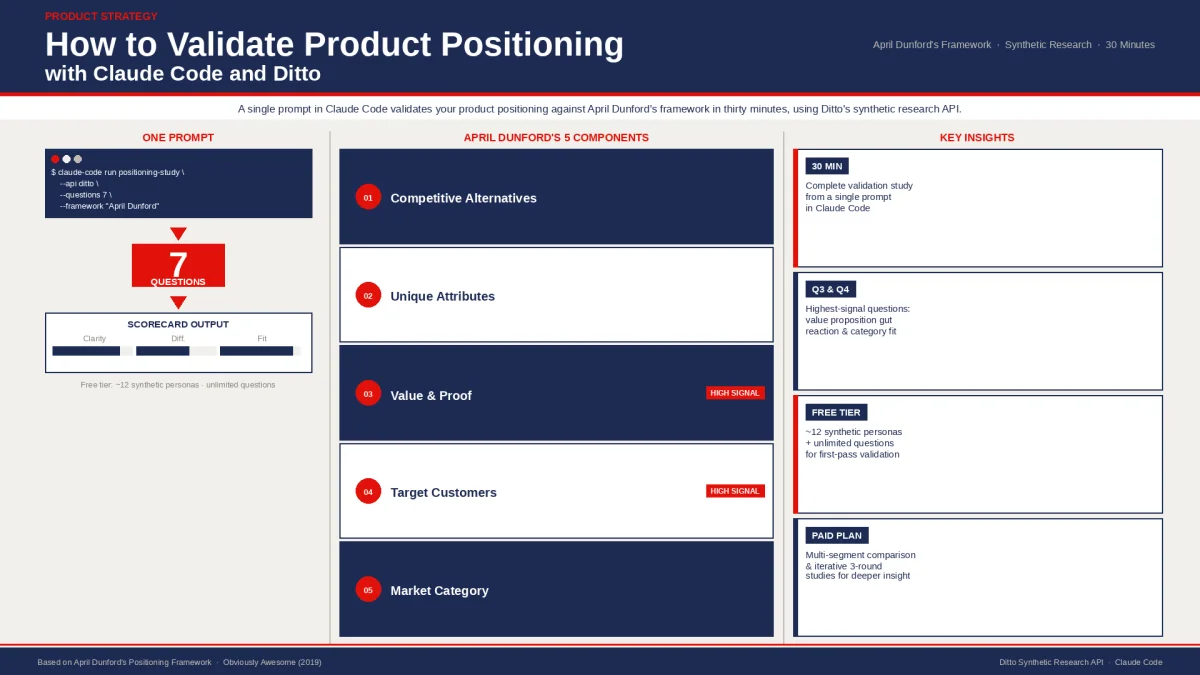
April Dunford's positioning framework is one of the most cited in product marketing. Five components: competitive alternatives, unique attributes, value and proof, target customers, and market category. Most teams treat it as a workshop exercise. You fill in the boxes, argue about wording, and hope the answers hold up when they meet real customers.
This guide skips the workshop. You are going to validate your positioning against synthetic consumers in about thirty minutes, using Claude Code and Ditto's research API. The methodology comes from Ditto's Positioning Validation Guide for Claude Code, which contains a complete seven-question study design mapped to each Dunford component. Your job is to point Claude at the guide, tell it about your product, and let it run.
This is the first article in a practical series on running product research from your terminal. Each article takes one of Ditto's Claude Code Guides and walks you through exactly what to do as a human to get Claude Code to execute it.
What You Need Before You Start
Claude Code installed and working in your terminal. If you do not have it yet, see Anthropic's setup guide.
A Ditto API key. The free tier works for a basic positioning test. Run this in your Claude Code terminal to authenticate:
Get Your API Key
curl -sL https://app.askditto.io/scripts/free-tier-auth.sh | bash
This opens Google sign-in in your browser, captures your API key, and saves it to ~/.ditto_free_tier.env. The script is open and readable.
A clear description of your product. Before you open Claude Code, write down three things:
What your product does (one sentence)
Who it is for (your target customer)
Who you compete with (two or three named competitors)
You will paste these into your prompt. Claude Code needs them to customise the study questions.
A Note on the Free Tier
The free tier gives you approximately twelve personas from a shared US adult panel with balanced demographics. This is enough to run a meaningful positioning test and identify patterns in how people perceive your product.
However, the full Positioning Validation Guide recommends custom demographic targeting, multi-segment comparison, and iterative three-round studies. For those capabilities, you will need a paid Ditto plan which unlocks custom research groups, larger panels, and demographic filtering. The free tier is an excellent starting point; it shows you how the workflow operates and whether positioning validation through synthetic research is useful for your team.
Step 1: Give Claude Code the Guide
Open Claude Code in your terminal. Paste the following prompt, replacing the bracketed sections with your product details:
I want to validate the positioning of my product using Ditto's synthetic research API. My product: [PRODUCT NAME] - [one sentence description] Target customer: [who it's for] Competitors: [Competitor A], [Competitor B] Please follow this guide exactly: https://askditto.io/claude-code-guide/validate-product-positioning-guide Use my Ditto API key from ~/.ditto_free_tier.env Run the full 7-question study with the free tier panel, then give me the Positioning Validation Scorecard.
That is the entire instruction. Claude Code will read the guide, understand the seven-question framework, authenticate with your API key, and execute the study autonomously.
Step 2: What Happens Next
Once you send the prompt, Claude Code works through the guide's workflow:
Asks the free tier panel your first question (competitive landscape: what comes to mind when they think about your problem space)
Polls for responses (typically fifteen to sixty seconds per question)
Asks the remaining six questions sequentially, each building on the conversational context of previous answers
Completes the study and triggers automated analysis
Generates deliverables based on the guide's framework
The full cycle takes roughly ten to twenty minutes. You do not need to do anything during this time. Claude Code handles the API calls, polling, error handling, and analysis.
What the Seven Questions Test
The guide's study design maps directly to Dunford's five positioning components. Understanding what each question targets helps you interpret the results:
Competitive landscape — "When you think about [problem space], what comes to mind first?" Tests whether your assumed competitors match reality.
Current solutions — "Walk me through how you currently solve [problem]." Reveals the actual tools and workarounds people use.
Value proposition response — "If I told you there was a product that [your value prop], what's your gut reaction?" Measures excitement versus scepticism.
Category alignment — "How would you describe [product] to a colleague?" Tests whether people categorise you the way you intend.
Competitive differentiation — "Compared to [Competitor A] and [Competitor B], what would make you choose a new option?" Identifies switching triggers.
Primary value driver — "If [product] could only do ONE thing brilliantly, what should that be?" Reveals whether your lead value matches customer priority.
Adoption barriers — "What would stop you from trying something like this?" Surfaces objections and proof requirements.
Step 3: Reading Your Results
After the study completes, Claude Code will present its analysis. Ask it to structure the output as the guide specifies:
Please give me: 1. The Positioning Validation Scorecard (each Dunford component scored) 2. The top 3 surprises from the responses 3. Specific quotes that support or contradict our current positioning 4. Recommended changes to our positioning statement
The Positioning Validation Scorecard rates each of the five Dunford components:
Strong = personas confirmed your assumption (e.g., they named the competitors you expected)
Weak = personas contradicted your assumption (e.g., they categorised you in a different market category)
Pay particular attention to Question 3 (value proposition) and Question 4 (category). If people's gut reaction to your value prop is scepticism rather than excitement, or if they describe your product using different category language than you use, those are the highest-signal findings.
Worked Example: A Project Management Tool
To make this concrete, here is what the prompt looks like for a fictional product:
I want to validate the positioning of my product using Ditto's synthetic research API. My product: FlowBoard - AI-powered project management for remote teams of 5-50 people Target customer: Remote team leads and project managers at small companies Competitors: Asana, Linear Please follow this guide exactly: https://askditto.io/claude-code-guide/validate-product-positioning-guide Use my Ditto API key from ~/.ditto_free_tier.env Run the full 7-question study with the free tier panel, then give me the Positioning Validation Scorecard.
In the guide's hypothetical results for this example, the study revealed that eight out of ten personas named Notion as their primary project management tool, not Asana or Linear. The assumed competitive alternatives were wrong. The value proposition ("AI predicts project delays") generated scepticism about accuracy. And nine out of ten personas said visibility mattered more than prediction.
Those are three positioning corrections identified in a single thirty-minute study. The traditional approach to surfacing these insights would involve weeks of customer interviews.
Going Further
The free tier gives you a solid first pass. If the results are useful and you want to go deeper, the guide describes several advanced techniques available on paid plans:
Custom demographic targeting — recruit personas matching your actual ICP (age, employment, location, education)
Multi-segment comparison — run identical studies against SMB, mid-market, and enterprise segments to see how positioning lands differently
Iterative three-round studies — revise your positioning based on Round 1, test the revision in Round 2, and validate the final version in Round 3
A/B positioning tests — run two groups with different value propositions and compare excitement versus scepticism levels
You may need to upgrade to a paid tier to perform this work fully. But the free tier study will tell you whether this approach is worth investing in.
What Comes Next
This is the first article in the How To series. Each article takes one of Ditto's Claude Code Guides and shows you, step by step, how to instruct Claude Code to execute it. Coming next:
How to Test Product Messaging with Claude Code — using the Product Messaging Guide
How to Run Pricing Research with Claude Code — using the Pricing Research Guide
How to Build Competitive Battlecards with Claude Code — using the Competitive Intelligence Guide
The guides are written for Claude Code. These articles are written for you.